Guide
How to check your Claude Code 5-hour and weekly usage limits
Type /usage in Claude Code to see your plan's usage limits, or open Settings → Usage on claude.ai, which shows progress bars for the five-hour session limit and the weekly limit. To keep the numbers in view while you work, read the rate_limits fields in a custom status line, or use a meter app.
How the limits work
On Pro and Max plans there are two windows. A session limit resets every five hours, and a weekly limit applies across all models. Max 5x and Max 20x get five and twenty times Pro's allowance per session. When you run out, Claude Code tells you with "You've hit your session limit" or "You've hit your weekly limit". Team and Enterprise seats use the same rolling five-hour and weekly windows.
1. The /usage command
Inside any Claude Code session, run:
/usage
It shows session cost, your plan's usage limits and activity stats. Subscribers see usage bars for the current windows. /cost and /stats are aliases. /status shows your version, model and account, but not limits.
2. Settings → Usage on claude.ai
In Claude on the web or the desktop app, Settings → Usage shows progress bars for the five-hour session and the weekly limit, with the reset times. It's the easiest place to check from your phone.
3. Keep it in your status line
Claude Code passes session data as JSON to your status line script on standard input. For Pro and Max subscribers it includes a rate_limits object after the first API response in a session:
| Field | Meaning |
|---|---|
rate_limits.five_hour.used_percentage | Share of the five-hour window used, 0 to 100 |
rate_limits.five_hour.resets_at | When it resets, in Unix epoch seconds |
rate_limits.seven_day.used_percentage | Share of the weekly window used |
rate_limits.seven_day.resets_at | When the weekly window resets |
Save this as ~/.claude/statusline.sh and make it executable. It's a trimmed version of the example in the docs and needs jq:
#!/bin/bash
input=$(cat)
FIVE_H=$(echo "$input" | jq -r '.rate_limits.five_hour.used_percentage // empty')
WEEK=$(echo "$input" | jq -r '.rate_limits.seven_day.used_percentage // empty')
OUT=""
[ -n "$FIVE_H" ] && OUT="5h: $(printf '%.0f' "$FIVE_H")%"
[ -n "$WEEK" ] && OUT="${OUT:+$OUT }7d: $(printf '%.0f' "$WEEK")%"
echo "${OUT:-limits appear after the first reply}"
Then point Claude Code at it in ~/.claude/settings.json:
{
  "statusLine": {
    "type": "command",
    "command": "~/.claude/statusline.sh"
  }
}
You can also type /statusline and describe what you want, and Claude Code writes the script for you. The catch with any status line is that you only see it in the terminal you're looking at. With several sessions, or the terminal hidden behind an editor, the number is out of sight when it matters.
4. A meter outside the terminal
Menu bar meters and notch apps show the same figures wherever you are. Notchbird puts Claude and Codex limits in the header of its Inbox, draws a thin meter in the notch once you pass 80%, and gives you one notice at 90%.
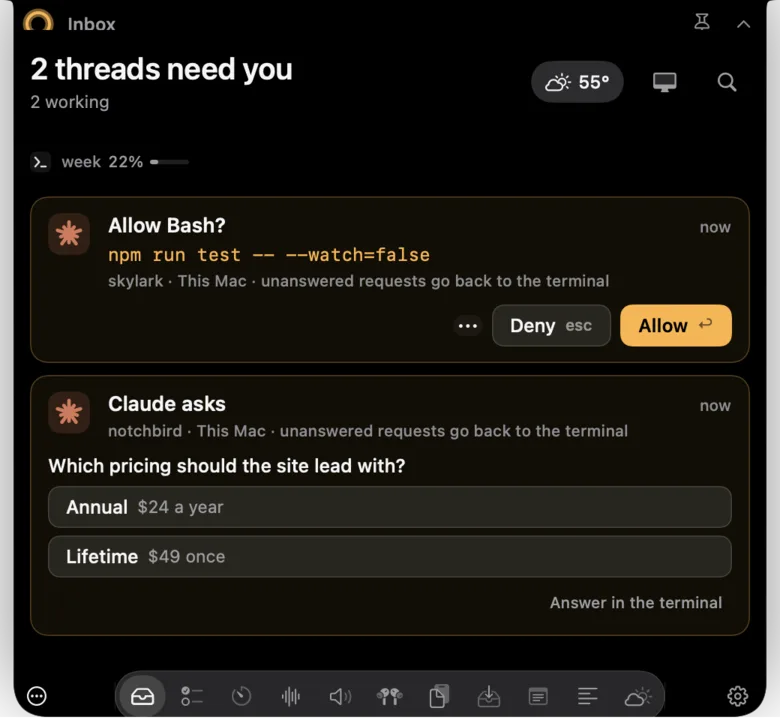
For the Claude percentages, turn on Notchbird's optional status line helper, which uses the figures Claude Code already provides to status lines. Without it, Notchbird still tells you when a limit has been hit. Everything is read from local files on your Mac, and nothing is sent anywhere.
Which to use
| Method | Always visible | Covers every session | Setup |
|---|---|---|---|
/usage | No, on demand | Yes, it's your account | None |
| Settings → Usage | No | Yes | None |
| Status line | In that terminal | One per session | A script and a settings entry |
| Notchbird | In the notch above 80% | Yes, with Codex alongside | Turn on the helper |
Related: answer permission prompts without the terminal and get notified when Claude finishes.
Sources
- Claude Code docs: commands (/usage)
- Claude Code docs: status line, rate limit usage
- Claude Code docs: costs and usage limits
- Claude Help Center: what is the Max plan?
- Claude Help Center: usage limit best practices
Common questions
How do I check my Claude Code usage limit?
Run /usage in a Claude Code session to see your plan's usage limits, or open Settings, then Usage, on claude.ai for progress bars and reset times for the five-hour and weekly limits.
When does the Claude Code limit reset?
The session limit resets every five hours, and a separate weekly limit applies across all models. Settings, then Usage, shows when each one resets.
Why is rate_limits missing from my status line input?
It is only present for claude.ai Pro and Max subscribers, or behind a Claude apps gateway with spend limits, and only after the first API response in a session.
Notchbird keeps your Claude and Codex limits in the notch and warns you once at 90%.
Try Notchbird free